From a new Binance account to your first US stock order, every step in order
Binance's own sign-up guide ends with the sentence that sets the order of everything below: "you must complete identity verification before trading." Creating the account takes a handful of screens. Verifying it, securing it, getting money into it and placing a first order is the longer part, and that is what this page walks through, in the order you will meet it.
Sign up, verify your ID, switch on two-factor authentication, deposit a small amount of USDT over the network Binance's deposit screen shows, then buy one bStock on Spot with a limit order. If you arrive through our link, check that the referral code shows as [Linked] before you press Next, because it can't be changed afterwards.
If the word bStock means nothing to you yet, what bStocks are explains the product in about ten minutes. You don't need it to follow the steps, but it explains why step 6 offers two different things to buy.
Before you start: who this is for
Two filters come before any form. The first is Binance itself. Binance isn't available everywhere, and what you can use depends on where you live and how your account is verified. The sign-up page and your local terms decide, not this guide.
The second is the product. Binance offers bStocks through a prospectus approved in the ADGM (Abu Dhabi Global Market), to eligible users in permitted jurisdictions only, and not to US persons. The disclaimer on its bStocks pages says tokenized securities are not offered, sold or made accessible in the United States or to US persons, and using the product counts as a statement that you are not one. Binance names no countries on the pages we read; whether bStocks show up in your account, and what your local rules say, decide it. If they don't show up, take that as the answer. Binance says it may restrict, cancel or unwind transactions that breach eligibility rules, so we don't point to workarounds.
If both filters are clear, have these ready:
- An email address or phone number you control, and its password.
- A valid identity document and a phone or laptop with a working camera.
- Some USDT on another platform or wallet, or a plan for buying some.
- An amount you could lose without it hurting. A first order is a test of the process, and the price can fall the day after.
Step 1: Reach the real sign-up page
Fake exchange pages copy the real design closely and exist to collect passwords and one-time codes. Three habits cover most of the risk:
- Read the address bar. The sign-up form sits on accounts.binance.com. Extra letters, swapped characters or an unfamiliar ending mean you should close the tab.
- Skip links you didn't go looking for. Search ads, shortened links and messages from strangers can all lead to a copy.
- Install the app from your phone's official app store, never from a file someone sends you.
The button below opens Binance's sign-up page with our referral code, BN1899, attached. You can equally type the address yourself and sign up without any code; the account works the same way.
Eligible new users who sign up through this site's link can get up to 20% of their trading fees back. The actual rate, which products count, which regions qualify, the conditions and how long it lasts are whatever Binance's sign-up page shows at the time, within your local terms. stok24 may earn a commission if you sign up through this link. stok24 is not an official Binance website. Trading carries risk; check the rules before you decide.
Go to the Binance sign-up page →One point about that rebate, so it doesn't mislead you later. The rebate comes out of trading fees you actually pay, so trades that carry no fee earn nothing back. Binance's referral FAQ says the same from the other side: no commission is generated from a referred user's trading with no trading fee.
Step 2: Create the account
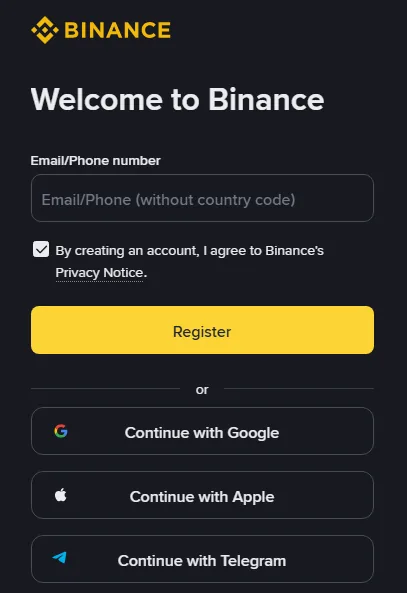
Binance's guide to registering on the website describes this sequence for an email or phone sign-up:
- Enter your email address or phone number and start the sign-up. On the page we captured the button reads Register; the guide calls it [Sign Up]. Button labels move around, so go by position rather than wording.
- Read the Terms of Service and Privacy Policy, tick the box and click [Next]. On the page we captured, the box was already ticked.
- Type in the 6-digit code sent to your email or phone. The guide gives you 30 minutes before it expires.
- Set a password of at least 8 characters with at least one uppercase letter and one number. Those are Binance's minimums. We would go longer, and never reuse a password from another site.
- The account is created. On this screen the referral code appears if you came through a link: the guide says it "should be automatically filled" with a green tick and [Linked] next to it.
The same guide adds that once a referral code is linked it cannot be modified. Personal and entity accounts are also separate types that can't be switched after registration, so pick personal unless you are signing up a company. Google, Apple and Telegram sign-ups reach the same referral screen by a slightly different route.
Step 3: Verify your identity
Verification is where the waiting happens. Binance's help page on identity verification says all new users must complete the level it calls [Verified] before they can use its products, "including cryptocurrency deposits and trades". The June 2026 listing announcement for bStocks repeats the point for these pairs: users need to complete account verification to trade them.
On the website the path is: hover over the profile icon, choose [Account], go to [Identification] and click [Get Verified]. The app has the same flow in its own menu. From there:
- Choose your country of residence, the country that issued your document, and the document type.
- Upload the document, or scan a QR code to finish on your phone. Whether manual upload is offered depends on the country.
- Upload the front and back of an ID card if that is what you chose.
- Do the liveness check with the camera. Binance asks you not to wear a hat or glasses, not to use filters, and to make sure the lighting is good.
- Confirm your personal details. The guide warns you can't change them once confirmed, so compare every letter with the document.
Binance says submitted documents are usually reviewed within 48 hours, with some cases taking longer, and it sends a notification when you are through. Two things we'd avoid while waiting: refreshing the browser mid-process, which the guide tells you not to do, and resubmitting over and over. If a real support agent contacts you about verification, they will not ask for your password, your 2FA codes or a transfer. Anyone who does is not support.
Step 4: Lock the account down
Do this before any money arrives. Binance's registration guide ends with a recommendation to enable at least one form of two-factor authentication (2FA). An authenticator app generates a six-digit code that changes every few seconds, so a stolen password alone doesn't open the account. Then look after the email address behind the account, since it is the route for password resets: give it its own strong password and its own 2FA.
| Check | What it should look like |
|---|---|
| How you log in | Typed address or bookmark, or the official app only |
| 2FA on the exchange | On, with the backup for your authenticator stored offline |
| Email account | Strong unique password plus its own 2FA |
| Messages from "support" | Anyone asking for codes, passwords or a transfer is a scammer |
Step 5: Deposit USDT without losing it
Whichever way you buy in step 6, the account needs funds. Both routes accept USDT: bStocks on Spot trade against USDT, and the stock side takes USDT and converts it to USDC when you submit the order. This walkthrough uses USDT because it covers both.
If you already hold USDT somewhere else, Binance's deposit guide gives this path in the app: tap [Deposit], choose [Deposit Crypto], pick the coin, then pick the network. That last choice is the one that costs people money. The guide says the network you select has to be the same as the network on the platform you are sending from, and that the wrong one can mean funds are lost for good. USDT runs on several blockchains, so the name alone tells you nothing about the route.
- On Binance, choose USDT and a network, then copy the deposit address shown for that network.
- On the sending platform, choose exactly the same network and paste the address.
- Send a small test amount first. When it arrives, send the rest.
Under [More Details] on the deposit screen you can choose whether the deposit lands in your Spot Wallet or your Funding Wallet. Spot is the simpler choice for step 6, because a bStock order on Spot draws from it; the stock side accepts either. How long the deposit takes depends on the blockchain and how busy it is. If you don't hold any crypto yet, the same [Deposit] menu offers other options besides [Deposit Crypto]; which ones appear depends on your region, so we don't describe them here.
How much? Enough for one small order plus a margin for price movement. The stablecoin to shares calculator turns a USDT amount into a rough share count before you commit.
Step 6: Place your first order
Binance's Academy guide lists three ways to end up holding a US stock position, and two of them are useful for a first order.
| bStock on Spot | Stock via [Trade] > [Stock] | |
|---|---|---|
| What you get | A token backed 1:1 by a share, not the share itself | A stock position; Binance says users are the beneficial owners of shares bought this way |
| Paid with | USDT, against a pair such as NVDAB/USDT | USDC, or USDT and other listed assets converted to USDC on submission |
| When it trades | 24/7 | Up to 24 hours a day, 5 days a week, for selected stocks; market orders only fill in regular US hours |
For a first order we'd take the Spot route with a small limit order. Here is how it goes:
- Open [Spot] > [bStocks] and search for the ticker. bStock tickers end in B: Tesla is TSLAB, Nvidia is NVDAB. BNB also ends in B, so read the full name on the pair before you trust it.
- Look at the order book. A wide gap between the best bid and the best ask means a market order would cost you more than the chart suggests.
- Choose Limit, enter the price you are willing to pay and the amount. On 26 September 2026 the Spot trading parameters page showed a minimum order size of 5 USDT for NVDAB/USDT; other pairs have their own figures, and they can change.
- Review and place the order. If the price doesn't reach your limit, the order waits in the book until it fills or you cancel it.
Timing matters more than on a crypto pair. When the US market is closed, Binance's bStocks FAQ says prices are set by supply and demand on Binance and "may move independently of the underlying equity's last close". A first order placed during regular New York hours has a live stock price behind it. The market hours converter shows when that is in your time zone.
If you'd rather hold the stock itself, the route is [Trade] > [Stocks] in the app or on the website (Binance's own pages spell it both Stock and Stocks). You search for the company, choose Market or Limit, pick the Spot or Funding account to pay from and tap [Preview], which shows the session, time-in-force and a fee breakdown. With USDT you then confirm with [Convert & Buy]. A market order placed outside regular US trading hours sits in a queue until the market opens. How to buy US stocks on Binance compares the two routes in more depth, including the option to tokenize a stock order as it fills.
Costs differ by route too. Binance's bStocks FAQ lists zero commission and zero conversion fees and says network fees and trading spreads may apply, while its bStocks landing page says standard spot trading fees apply on Spot. The stock side charges no commission but does charge a platform fee or a spread. We don't quote rates here because they change; the order preview shows what you will pay, and what a US stock trade on Binance costs explains where to look.
Step 7: Check what you actually hold
A limit order that hasn't filled isn't a position yet. Open your order history first: if the order still shows as open, nothing has been bought. Once it fills:
- A bStock bought on Spot sits with your other spot holdings, listed under its ticker. The Academy guide describes trading it "like any other crypto asset", so look for it where your other tokens are, not in a separate stock section.
- A stock bought on the stock side appears under that product. When you sell, Binance's stock trading FAQ says the proceeds arrive as USDC in your Funding Account, and until settlement completes they can only be used for spot, stock trading and earn subscriptions.
The number next to the position moves with the price. It is a valuation until you sell. Selling mirrors buying: same pair or same stock page, switch to Sell, and use a limit order if the book is thin.
Before a second order, three pages to read: tokenized stock risks, how little you can spend on a US stock, and converting bStocks back to stock.
Sources, read 26 September 2026: Binance, How to Register on the Binance Website? (updated 24 November 2025); Binance, How to Complete Identity Verification for a Personal Account? (updated 5 June 2026); Binance, Frequently Asked Questions on Binance Referral Pro Mode (updated 5 August 2026). Also read the same day, not linked: Binance's How to Deposit Crypto to Binance? guide, the Binance Academy guide What Are bStocks? (updated 29 June 2026), the bStocks FAQ (updated 28 July 2026), the bStocks landing page, the bStocks listing announcement of 11 June 2026, the stock trading FAQ What Is Binance Stock Trading and How to Trade Stocks on Binance? (updated 13 September 2026) and the Spot trading parameters page. stok24 has not gone through these steps on a live account for this page; it describes Binance's published instructions. Where the sign-up screen and this page differ, follow the screen.